
Chorefriend: Cleaning Schedule
System Two GmbHHouse & Home
4.5153.00 Reviews
- Version
- 1.0.29
- Installs
- 50.00K
- Age Rating
- Everyone
Screenshots
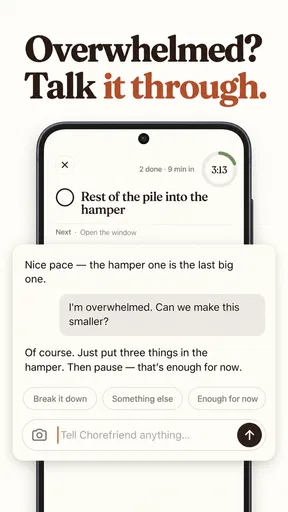
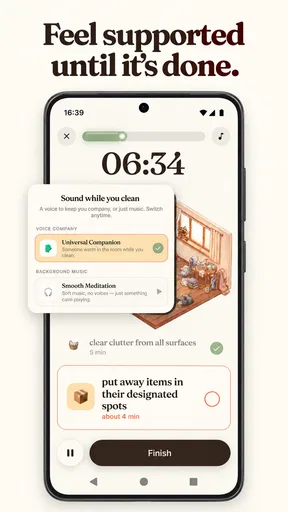

Our Review of Chorefriend: Cleaning Schedule
 Analysis by Appyee
Keeping a home clean is rarely difficult because people do not know what to do. The harder part is remembering what needs attention, deciding when to do it, and stopping a few neglected jobs from turning into an exhausting weekend. Chorefriend: Cleaning Schedule approaches that problem as a dedicated chore tracker and home planner, rather than as a general notes app or a broad task manager. After spending time with it, I found its central idea more useful than its deliberately simple presentation: turn household maintenance into a routine that is visible enough to follow without making cleaning feel like another complicated project.
That focus makes it an interesting choice in the House & Home category. It is a free app from System Two GmbH, with optional in-app purchases ranging from $6.99 to $69.99 per item. Its age rating is Everyone, and the current release is version 1.0.25 for devices running Android 8.0 or later. The app has reached over ten thousand installs and holds a 4.7 average from around seven hundred ratings, which suggests that its straightforward approach is connecting with the people who want help maintaining a home rather than managing an elaborate productivity system.
A cleaning schedule built around remembering less
The most important capability here is not simply recording chores. It is giving recurring household work a place where it can be seen and handled as a continuing routine. That distinction matters. A normal checklist is useful for a one-off shopping trip, but cleaning is repetitive by nature. If a task disappears after it is checked, the system has not really solved the problem; it has only recorded one completed instance.
Chorefriend is more appealing when I treat it as a memory aid for the home. Instead of relying on the vague thought that the bathroom, floors, laundry, or kitchen “need doing soon,” I can use a planned schedule to make those responsibilities easier to recognize. The practical effect is small but meaningful: I spend less mental energy reconstructing what I did last week and more time choosing what is actually worth doing today.
I also like that the app’s purpose is immediately understandable. There is no need to translate a project-management system into household language. A home is not a workplace, and a cleaning routine does not need the same layers of labels, priorities, dependencies, and status fields that a professional project might require. The dedicated focus helps keep the attention on the rhythm of domestic work.
That focus is also the reason I would not recommend it to everyone. If you already have a task system that handles repeating reminders comfortably, adding a separate cleaning app may create another place to maintain. Chorefriend makes the most sense when household tasks are currently scattered between memory, paper notes, messages, and occasional bursts of motivation.
Why a dedicated planner can beat a general task app
General task apps are often more flexible, but flexibility can become friction. I have used systems where creating a recurring task required deciding on a project, a list, a priority, a date, and several optional settings before I could even record the job. That level of control is valuable for work. For cleaning, it can make a simple task feel heavier than the chore itself.
The advantage of this app is the narrower mental model. I open it with a household question in mind: what should be done, and when does it belong in the routine? That is a better starting point for people who do not want to build a productivity system around their home. The app is not trying to turn sweeping or changing linens into a performance metric. Its usefulness comes from reducing forgetfulness and decision fatigue.
There is a subtle trade-off here. A general task manager may be better if your home responsibilities are tied to appointments, shopping, repairs, shared documents, or a larger family calendar. Chorefriend is more convincing when the main issue is recurring upkeep. I would choose the specialized app for cleaning rhythm and a broader tool for a household command center that has to cover every kind of errand.
How the routine feels in everyday use
The best way to use Chorefriend is to begin with a realistic inventory rather than trying to make the home perfect on the first day. I would start by adding the jobs that genuinely cause problems when they are forgotten. That might mean a kitchen reset, bathroom cleaning, floor care, laundry, or changing bedding. The point is to establish a useful baseline, not to document every tiny action a person could possibly perform.
Once the important chores are represented, the schedule becomes more useful as a decision tool. On a busy day, I can look at the planned work and decide what deserves attention now. On a quieter day, I can move further through the list. This is different from waiting until the whole house feels untidy, because the app encourages smaller interventions before neglected areas become urgent.
One of my favorite practical adjustments is to separate chores by effort rather than pretending every task deserves equal treatment. A quick reset can fit into a short gap between other activities, while a deeper cleaning job needs more deliberate time. Even without turning the schedule into a rigid timetable, thinking this way prevents the common mistake of filling one day with an unrealistic pile of work.
A second useful workflow is to plan around the way the home is actually used. If the kitchen is busiest at the end of the day, its reset belongs in a routine that follows that activity. If laundry tends to accumulate because it is postponed indefinitely, giving it a visible place in the schedule is more helpful than relying on a general “cleaning day.” The value is not in following an ideal household routine; it is in matching the plan to real behavior.
I would also avoid adding chores simply because they sound responsible. A schedule that is too ambitious becomes a source of guilt, and guilt is a poor long-term reminder system. If I repeatedly postpone the same task, that is useful feedback: the timing may be wrong, the task may be too broad, or the expected frequency may not fit the household. The app works best when the schedule is edited honestly instead of treated as a promise that must never change.
A realistic weekday example
Imagine coming home after work to a kitchen that needs attention, laundry that has been waiting, and a bathroom that is approaching the point where it cannot be ignored. Without a plan, I might start with whichever job is most visible, lose momentum, and finish the evening feeling that nothing was properly completed. With a chore schedule, I can identify the task that matters most tonight and leave the less urgent work for its own place in the routine.
That sounds simple, but it changes the emotional shape of the evening. I am no longer trying to clean the entire home because it feels generally untidy. I am responding to a defined piece of maintenance. After completing it, the next occurrence remains part of the routine instead of forcing me to remember when it should happen again. The app’s strongest effect is therefore not making cleaning faster; it is making the next action easier to choose.
This approach is particularly helpful for people who are living alone, sharing a home with an uneven division of chores, or moving between busy and quiet weeks. It can also help someone who cleans intensely when things become overwhelming but struggles with regular upkeep. A visible schedule gives that person a middle path between doing nothing and attempting a complete reset.
The trade-offs behind a simpler approach
The first limitation is that any planner is only as reliable as the routine entered into it. Chorefriend cannot know how quickly a particular room becomes messy or how much time a user has on a given day. If I create an idealized schedule based on a different lifestyle, the app may feel demanding rather than supportive. The setup therefore deserves more thought than the marketing-friendly idea of simply adding tasks and forgetting about them.
There is also a risk of over-scheduling. Household work expands easily when every detail becomes a separate recurring item. A list that is technically thorough can be practically discouraging. I get better results by grouping related actions into sensible jobs, then keeping the schedule focused on outcomes I can recognize. The right amount of detail is enough to guide action, not so much that checking the app becomes a chore in itself.
The free entry point is a clear advantage for trying the concept, but the presence of optional purchases means users should consider how far they want to take the experience before committing to it as their main system. The individual purchase range extends from $6.99 to $69.99, so the difference between a casual trial and a deeper paid use can be significant. I would begin with the free experience and judge whether the routine genuinely changes my habits before paying for anything.
Another trade-off is specialization. Chorefriend is not the obvious choice for someone who wants a full household organizer combining bills, grocery planning, maintenance records, shared calendars, and family communication. A general productivity app may provide more room for those needs. The specialized design is a strength for cleaning, but it naturally narrows the situations in which it is the best single app.
I would also be cautious about using a digital schedule as a source of pressure. Cleaning needs vary with health, work, children, pets, guests, and energy levels. Missing a planned task should be treated as information, not failure. If the app encourages a user to reset the schedule after a difficult week instead of accumulating overdue guilt, it is serving its purpose. If the user feels judged by the list, the routine needs simplifying or another method may be healthier.
Who benefits most from this kind of planner
Chorefriend is a strong fit for someone who repeatedly thinks, “I know I need to do that, but I cannot remember when I last did it.” It is also suitable for people who want a dedicated place for household upkeep without learning a complex productivity platform. Renters, students, couples, and people setting up their first independent home can all benefit from starting with a small, repeatable cleaning rhythm.
It may be especially useful for a person whose home is not constantly messy but whose maintenance is inconsistent. That is a different problem from needing a deep-cleaning guide. The app does not need to teach every cleaning technique to be valuable; its role is to help turn occasional effort into a pattern. For that user, reducing the number of decisions made during a busy week can be more important than adding more cleaning advice.
Shared households should think carefully about how they want to use it. A schedule can make responsibilities visible, but visibility alone does not create fair ownership. If one person remains responsible for checking the app, assigning work, and reminding everyone else, the digital system may simply formalize an existing imbalance. I would use it as a shared reference only after agreeing on who owns each task and what “done” means.
On the other hand, I would skip it if I dislike recurring lists, rarely use mobile planners, or already have a trusted system that handles household routines without effort. I would also look elsewhere if my main need is detailed cleaning instruction rather than scheduling. Chorefriend is about organizing the rhythm of chores, not replacing practical knowledge, equipment, or a realistic division of labor.
My final view after using the cleaning-focused approach
Chorefriend: Cleaning Schedule succeeds because it takes a familiar domestic problem seriously without making it sound like a corporate productivity challenge. Its central capability—keeping recurring household work visible—has a real effect when the alternative is relying on memory. I found it most useful as a gentle prompt for deciding what matters today, not as a strict scoreboard for judging how well I maintain a home.
The strongest results come from a restrained setup: add the chores that are genuinely easy to forget, give them a rhythm that matches real life, and revise the plan when it repeatedly fails. That workflow is more important than filling the app with every possible task. Used that way, it can help prevent the familiar cycle of neglect, panic-cleaning, and starting over.
System Two GmbH has positioned this as an accessible home app rather than an all-purpose organizer, and that specialization is both its appeal and its boundary. The 4.7 average from roughly seven hundred ratings and its growing install base make it worth considering, but the numbers matter less than whether a dedicated cleaning routine fits your habits. Since it is free to start and rated for Everyone, trying the basic approach is relatively easy; I would simply evaluate the optional purchases carefully before spending.
My recommendation is straightforward: use it if you want a calmer way to remember recurring chores and you are willing to keep the schedule realistic. Do not use it as evidence that every task must happen on time, and do not expect it to replace a broader home-management system if your needs extend far beyond cleaning. For the right user, the app’s real benefit is modest but valuable: fewer forgotten jobs, fewer last-minute cleaning marathons, and a clearer sense of what the home needs next.
Privacy and Permissions
See what permissions an app requests and how it handles your data.
- Photos/Media/Files
- read the contents of your USB storage, modify or delete the contents of your USB storage
- Storage
- read the contents of your USB storage, modify or delete the contents of your USB storage
- Camera
- take pictures and videos
- Microphone
- record audio
- Other
- view network connections, full network access, run at startup, control vibration, prevent device from sleeping, Google Play license check, read Google service configuration
Verdict
Strengths of Chorefriend: Cleaning Schedule
- Simple task scheduling keeps cleaning routines easy to follow.
- Recurring chores reduce the chance of forgetting regular household jobs.
- Useful for dividing responsibilities among family or roommates.
- Clean interface makes adding and reviewing chores straightforward.
- Helps turn large cleaning projects into manageable daily tasks.
Limitations of Chorefriend: Cleaning Schedule
- Some useful features may require in-app purchases or a subscription.
- Limited customization could frustrate users with complex cleaning routines.
- Notifications may become repetitive when many chores are scheduled.
- Requires consistent updates to keep schedules accurate and useful.
- The app may feel unnecessary for users with very simple cleaning habits.
Similar Picks in This Category
View All
Universal TV Remote Control
CodeMatics Media Solutions3.9

AlfredCamera Home Security app
Alfred Systems Inc.4.7

Planner 5D: AI Home Design
Planner 5D4.5

Universal Tv Remote-Cast to TV
One Music Player4.1

Zillow: Homes for Sale & Rent
Zillow Group4.8

99acres Buy/Rent/Sell Property
infoedge.com4.3
Frequently Asked Questions
What is Chorefriend: Cleaning Schedule, and who is it designed for?
Chorefriend: Cleaning Schedule is an organization app designed to help users plan, divide, and track household cleaning tasks. It can be useful for individuals, couples, families, roommates, or anyone who wants a clearer routine for recurring chores. Instead of relying on memory or handwritten lists, users can create cleaning schedules, assign responsibilities, and monitor completed tasks in one convenient place.
Can I create recurring cleaning tasks and customize the schedule?
Yes, the app is intended for recurring household routines, so you can set up tasks that need to be completed daily, weekly, monthly, or according to a schedule that fits your home. You can usually customize task names, frequencies, and responsibilities, making it possible to organize everything from washing dishes and taking out the trash to deep-cleaning bathrooms or changing bed linens.
Is Chorefriend: Cleaning Schedule suitable for families and roommates?
The app is particularly useful for shared homes because cleaning responsibilities can be organized more clearly between multiple people. Families and roommates can use it to divide chores, reduce confusion, and see which tasks have already been completed. Before downloading, check the current app version to confirm whether shared accounts, invitations, synchronization, or multi-user features are included on your device.
Does the app send reminders for upcoming or overdue chores?
A cleaning scheduler is most helpful when it can remind you about tasks before they are forgotten, and Chorefriend is built around maintaining consistent routines. Depending on your device settings and the version installed, reminders may require notification permission and proper background access. Make sure notifications are enabled if you want alerts for upcoming, recurring, or unfinished cleaning tasks.
Is Chorefriend: Cleaning Schedule free to download, and are there any limitations?
The application may be available to download without an upfront charge, but availability of features, advertisements, subscriptions, or in-app purchases can vary by platform and app version. Users should review the Google Play Store or Apple App Store listing before installing, especially if they need advanced scheduling, unlimited tasks, household sharing, cloud synchronization, or other premium functions.
